
How to change your advert’s colour and banner
3 min read · Updated
The short version
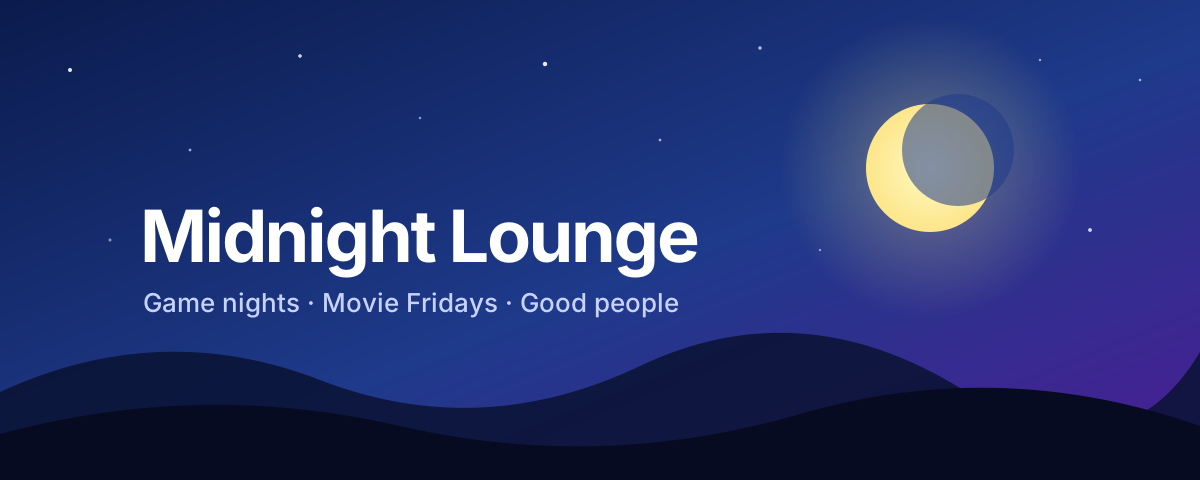
The colour is the stripe down the left side of your advert. Every server can change it. The banner is a wide picture under your text, for Premium servers. Both are changed in OneBump’s settings, in Discord or on the website.
- Colour: free. Pick a named colour, or type a code such as #2B68FE.
- Banner: Premium. 1200 × 480 pixels works best.
- PNG, JPG, WebP or GIF, up to 8 MB.
On this page
What are they?

OneBumpAPP
 https://discord.gg/your-invite
You’ve been invited to join a server
Midnight Lounge
4,218 Members
Midnight Lounge
General Information
 Created: -
 Members:
 4,218
 Boosts:
 0
 Bumps:
 1
 Category: Gaming
 Premium server
Server Description
Late-night gaming, movie Fridays and a friendly community. Game nights every week, a book club, and people who actually talk. Come say hi 👋
Advertisement Links
Support • Vote • Premium • Guilds.me
 Bumped By: Auto bump
 Join Server ↗
You need the The Discord permission you need to change OneBump settings. permission in that server. Owners and administrators have it.
How do I change the colour?
- In Discord: type
/settingsin your server. A menu called “OneBump settings” opens. Only you can see it. Press Colour & banner and pick a colour from the menu. For any other colour, press Other colour…, type a colour code and press Submit. - On the website: log in, press your server, then press the Settings tab. Pick a colour under Accent colour and press Save changes.
OneBumpAPP
🎨 Colour & banner
Colour · Blue (#2B68FE)
Banner · Premium 💎
The colour is the stripe down the left side of your advert. A banner is a wide picture under your description (Premium).
Only you can see this
Colour code
Colour code
A # and six letters or numbers, like #2B68FE. Search “colour picker” to find one.
Where do I get a colour code?
Search the web for “colour picker”. Pick a colour and copy the code that starts with #.
How do I add a banner? (Premium)
- In Discord: type
/settingsin your server. A menu called “OneBump settings” opens. Only you can see it. Press Colour & banner, then Upload banner. Choose a picture and press Submit. - On the website: log in, press your server, then press the Settings tab. Under Banner image, press Upload image and choose a picture. It is saved straight away.
OneBumpAPP
🎨 Colour & banner
Colour · Blue (#2B68FE)
Banner · None
The colour is the stripe down the left side of your advert. A banner is a wide picture under your description (Premium).
Only you can see this
What picture should I use?
| Rule | Value |
|---|---|
| Best size | 1200 × 480 pixels (wide) |
| File types | PNG, JPG, WebP or GIF |
| Largest file | 8 MB |
| Moving pictures | A GIF that moves is saved as a still picture. |
OneBump fits your picture to 1200 × 480. A picture with another shape is cut at the edges, so keep words and faces near the middle. OneBump stores its own copy of the picture.
How do I replace or remove a banner?
- In Discord: on the Colour & banner screen, press Replace banner or Remove banner. Removed it by mistake? For 10 minutes OneBump offers Put it back.
- On the website: under Banner image, press Replace image or Remove banner.
What happens to my banner when Premium ends?
It is not shown while your server is on Free. It is kept, and it shows again when the server has Premium again.
What can go wrong?
- “That isn’t a colour I know”. Use a colour code: a # and six letters or numbers, like #2B68FE.
- “That banner wasn’t saved”. The file is over 8 MB, or it is not a picture. Try a PNG or JPG.
- “A banner needs Premium”. Your server is on the Free plan. There the button says Add a banner (Premium) and opens the Premium page.
- “That banner can’t be put back any more”. More than 10 minutes passed since you removed it. Upload the picture again.
Quick answers
What size is a OneBump banner?
1200 × 480 pixels works best. PNG, JPG, WebP or GIF, up to 8 MB.
Is the advert colour free?
Yes. Every server can pick its own colour. Only the banner needs Premium.
Can my banner be animated?
No. A GIF is accepted, but it is saved as a still picture.
Your next step
Pick a colour that matches your server icon. It takes ten seconds.
Open my servers